Toolbox: A Bold Font for Web Design
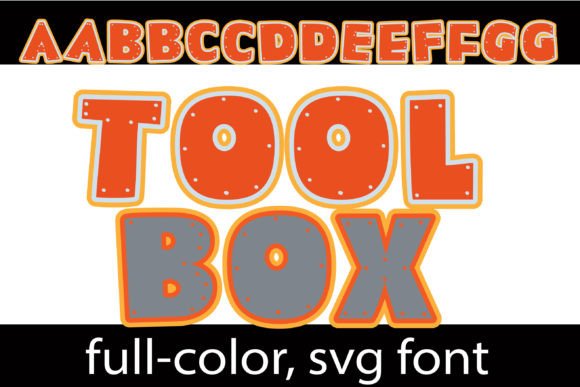
As a web designer, choosing the right font can make or break a design. Toolbox is a color font that brings a blocky, industrial feel to digital projects. With its orange and grey tones and subtle bolt accents, it adds a unique visual punch without overwhelming the user.
The font’s personality is modern and functional, making it ideal for brands that want to communicate strength and innovation. Its design works well in both dark and light environments, and the alt case offers additional color options through your system or Silhouette’s glyph map.
Using Toolbox in Web Design
Toolbox excels in headers, hero sections, and call-to-action areas where boldness matters. Its blocky structure ensures legibility even at smaller sizes, making it a great choice for buttons and short phrases. For example, on a creative portfolio site, Toolbox can be used for project titles to draw attention and create visual interest.
In an online boutique, Toolbox can appear in banners or product headlines to reinforce a brand’s identity. On a coaching website, it might be used for section headings to add energy and clarity. The font also works well in digital ads, where its eye-catching style helps messages stand out.
For a course sales page, Toolbox can be used in headlines to emphasize key benefits. In blog graphics, it provides a strong visual anchor that complements the content. Whether it’s a landing page or a brand kit, Toolbox supports a consistent and professional look across platforms.
Readability and Visual Hierarchy
Toolbox maintains readability even when used in small sizes, which is essential for mobile screens and responsive layouts. Its clean lines and structured form help users scan content quickly, improving overall usability. When paired with a simple sans serif font for body copy, it creates a balanced layout that feels both modern and approachable.
On dark backgrounds, the orange and grey tones of Toolbox pop effectively, while on light backgrounds, they remain subtle and refined. When used over images or overlays, the font’s contrast ensures it remains visible without clashing with the background.
Its visual weight makes it ideal for headings and logos rather than long paragraphs. As a display font, it shines in short phrases and decorative accents, adding character without sacrificing clarity.
Font Pairing and Brand Identity
When pairing Toolbox with other fonts, consider using a clean sans serif for body text to balance its boldness. This combination works well for websites that need a mix of personality and readability. For editorial designs, pairing it with a serif font can add sophistication and depth to the overall look.
Toolbox’s versatility allows it to fit into various brand identities. For a tech startup, it can convey innovation and reliability. For a creative agency, it adds a touch of modernity and energy. Its multilingual support makes it suitable for global brands looking for a consistent visual language.
Commercial font licensing is important when using Toolbox for websites, client projects, or online stores. Ensure you have the proper license to avoid legal issues, especially if the font will be embedded or distributed as part of a digital product.
Practical Applications for Digital Creators
Toolbox is a valuable addition to any designer’s toolkit. It can be used in social media graphics, email templates, and app interfaces to maintain a cohesive look. For SaaS founders, it adds a professional edge to landing pages and feature descriptions.
Marketers can use it in banners and ad creatives to grab attention and reinforce brand messaging. Bloggers can apply it to headers and subheadings to improve content scannability. For creative entrepreneurs, it’s a reliable choice for branding materials that need to stand out.
Whether you’re designing a product landing page or a digital brand kit, Toolbox offers a fresh and functional approach to typography. Its blend of style and usability makes it a go-to font for designers who value both aesthetics and performance.
By integrating Toolbox into your design workflow, you can enhance visual storytelling, strengthen brand presence, and create more engaging digital experiences. Its unique style and practical features make it a standout choice for modern web design.